
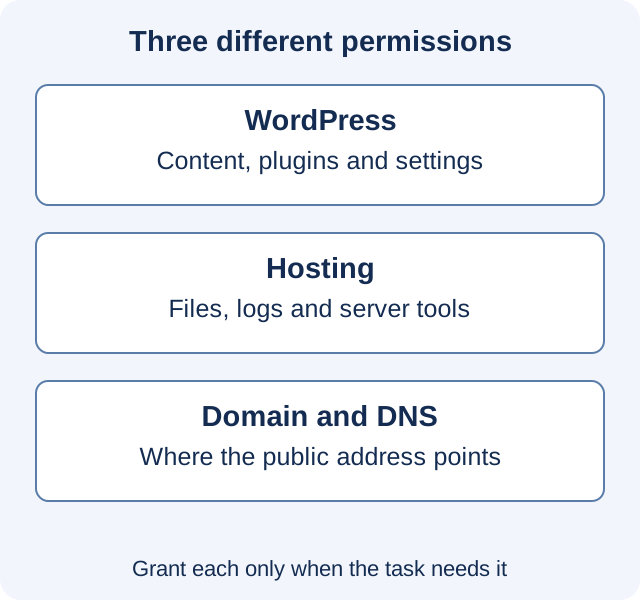
Give a WordPress helper access to the task they have agreed to perform, through an account you can identify and remove afterward. Start by asking what they need to change. Editing an article, replacing a theme file and moving DNS are three different jobs.
The former Systm Web knowledgebase asked for dashboard and file access for optimization work. This guide explains how to assess such a request today. The current publication does not collect credentials or act as the former provider’s support desk.
A WordPress login is one permission boundary
The WordPress roles documentation distinguishes an Editor, who can manage and publish posts including other users’ posts, from an Administrator, who has broad administration capabilities on a single site. Installing or activating a plugin is not the same task as correcting an article.
Check the actual site rather than relying only on a role’s name: plugins can add or change capabilities, and Multisite has a different network administration boundary. Ask the helper to explain the required action in plain terms. “I need to change this plugin’s configuration” is more useful than “I always need full access.”
Create an individual account for the work when appropriate. Do not make the owner’s everyday identity the shared identity of several contractors. Record who controls the new account and which job it belongs to. Temporary in your notes does not mean WordPress will automatically expire it; arrange the removal or permission change explicitly.
File access is a separate request
Someone investigating a broken theme may need files or logs that are unavailable in the dashboard. Ask which directories or tools they require and whether the host can provide a restricted account or staging environment. Confirm the restriction by checking what the account can actually access.
The OpenSSH SFTP manual describes file transfer over encrypted SSH transport. The WordPress hardening guide recommends SFTP where the host provides it. Do not assume that an old request labeled “FTP information” specifies the connection method you should use now.
Encryption protects the connection; it does not make broad file permissions narrow. Depending on the server setup, access to application files may also expose configuration or allow code changes. Ask the host how the account is restricted and whether it also grants shell access. A directory name in an email is not evidence of an enforced limit.
Keep domain and billing control distinct
A site repair does not automatically require access to a domain registrar, every site in a hosting account or the account’s billing details. A migration may legitimately involve DNS or certificates, but the person doing it should identify the records and systems affected.
Use the service’s delegated access features where they fit the task, or have the owner perform a clearly specified change. Avoid treating an entire hosting account as the only way to share one site. If delegation cannot be restricted as intended, agree another working arrangement rather than describing unrestricted access as limited.
Three requests, three different scopes
| Illustrative task | Access to discuss | Question before granting it |
|---|---|---|
| Revise and publish an article | A WordPress account with suitable editorial capabilities | Does the person need other authors’ content or only their own? |
| Investigate a theme error | A test copy, relevant logs and possibly restricted file access | Which files or configuration will be changed, and how will the change be recovered? |
| Move the site to another host | Access to agreed source and destination systems; a separate DNS plan if required | Who controls the final transfer and public switch? |
The table is a discussion guide, not a fixed permissions recipe. A customized site can require a different capability or workflow. The useful outcome is an access list tied to specific work, rather than a growing collection of accounts whose purpose nobody remembers.
Make the handoff usable
Agree the site address, environment, scope, working window and contact for unexpected findings. Provide credentials through an appropriate secure sharing method rather than a public ticket or a page that search engines can read. Use strong, unique credentials and the authentication protections available for each service; the WordPress hardening guide also recommends two-step authentication.
Before work begins, establish a recovery point and confirm which checks will show that the job succeeded. For example, a theme repair should preserve the article display and the affected interaction. “The developer could log in” is a setup check, not evidence that the repair worked.
Close access as deliberately as you opened it
Ask for a record of the changes and any continuing integration the work introduced. Remove or reduce the temporary accounts, keys and service permissions that are no longer needed. Review each system in the access list: closing a WordPress account does not itself remove a separate hosting or DNS account.
If a WordPress user owns content, review the deletion and reassignment choices before removing the user so that account cleanup does not discard intended material. If credentials were shared or exposed beyond the agreed audience, replace the affected credentials and review the related access.
Keep the final access list with your maintenance record. For a move, attach it to the migration plan. The next person should be able to see who can act, why that access exists and when it should be reviewed.
Historical source context: archived Systm Web page 1 · archived Systm Web page 2. Technical references above were checked on November 16, 2026. Illustrative scenarios are not reports of client work.